you have deleted three of these already
A year of showing up, in one glance.
So you know how this normally goes: two good weeks, one bad Thursday, a wall of red squares, and an app you can't open without wincing. This one is a grid you fill in and nothing else. Miss a fortnight and it just shows a gap. Come back after a year and it is exactly where you left it, with nothing owed.
Three habits free forever, no account. $19.99 once if you want more than three — no subscription required.
why the last three didn't last
💸
“It started asking me for money every month.”
This is one payment. Not a monthly one, not an annual one, not a founder's-rate-for-the-first-year one. Stop using it for eighteen months, open it again, and nothing has been charged and nothing has been taken away. That is the one promise a tracker on a subscription structurally cannot make you.
🟥
“It made every Tuesday look like a failure.”
A Monday/Wednesday/Friday habit shows nothing on a Tuesday here — not a red square, not a grey one, nothing. A habit you started on the 10th shows nothing before the 10th. Missed and never-scheduled are drawn differently because they are different things, and a grid that blurs them is a grid that is arguing with you.
🔕
“It wouldn't stop buzzing, so I turned it off, so I stopped using it.”
HabitGrid has no way to contact you. There is no server behind it and no sender — it could not ping you if we wanted it to. If you do want a nudge, any habit will build you a repeating calendar event on your device and hand it over, and your own calendar does the reminding.
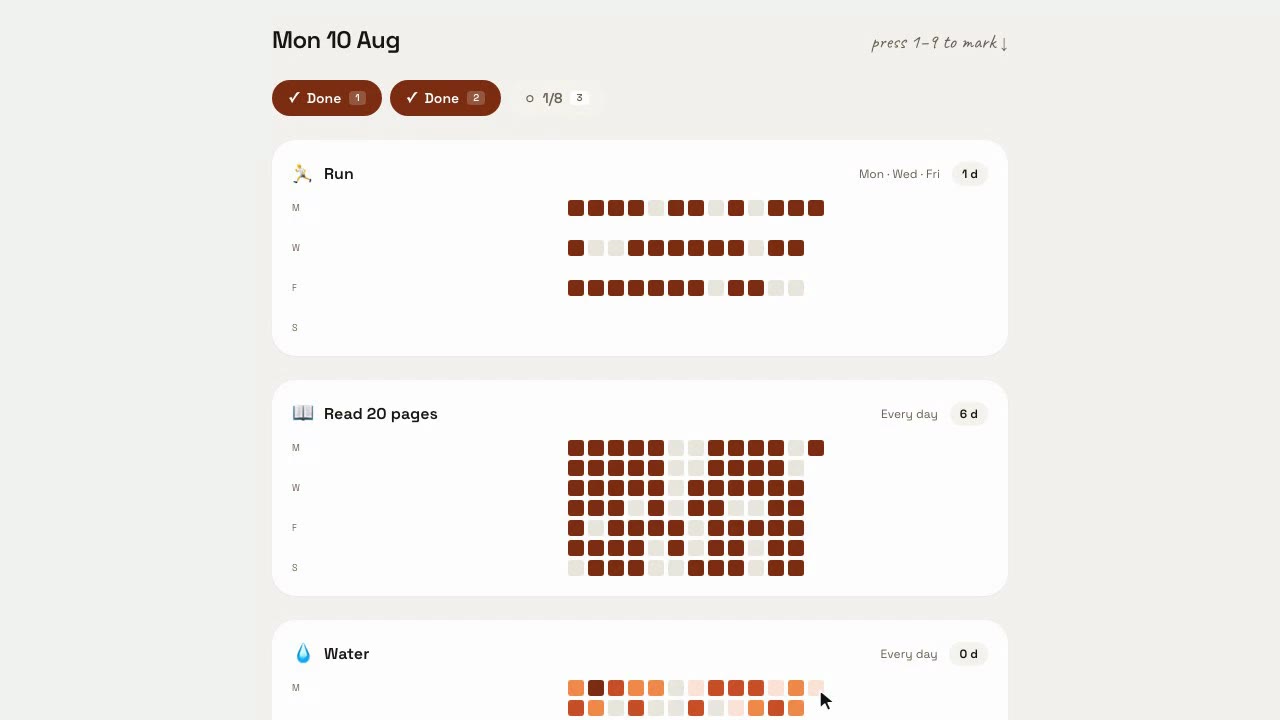
no titles, no mockups — this is the app ↓
Ten seconds a day. That is the entire product.
What to watch for: three squares filling in the rightmost column — that is today — and the streak count beside each habit moving as they land. Then notice what isn't there: no popup congratulating you, no badge, no prompt to invite a friend, and no red anywhere on the days the habit wasn't scheduled for.
And that is not a video — it is the running app with a year of sample data in it. Click a square. It fills.Open it full-size ↗
the awkward details, up front
Three states, not two
A square is kept, missed, or not tracked— and the third one is why this exists. Not tracked draws as no tile at all, so it can never read as failure. Today is never a miss until today is over. A “four times a week” habit has no individual bad day at all; the week either got there or didn't.
The numbers are worked out, never stored
Streak, longest streak and completion rate are recomputed from your actual marks every time the screen draws. Nothing is kept in a counter. A stored counter is what drifts, and a drifted counter is what tells someone they missed a day they did not miss — which is the moment people stop trusting a tracker and never open it again.
Yesterday is always still fillable
You ran, you forgot to tick it, you remembered on Thursday. Click Tuesday. There is no cut-off, no “retro edit” tier, no penalty. The honest consequence, said out loud: a streak here is worth exactly what you know it is worth, and worth nothing to anyone else — so there is nowhere to post it.
The reminder is a file, and it survives a flight
“Remind me” on any habit writes a repeating calendar event on your device and hands it to you to add wherever your alarms already work. It carries no timezone on purpose: it means 09:00 wherever you happen to be standing, so landing somewhere else doesn't drag your morning run to 04:30.
Four keystrokes and the morning is logged
Press 1, 2, 3 to mark the first three habits for today. Counted habits — eight glasses of water, twenty pages — fill their square proportionally as you add to them, so a half-done day looks half-done rather than failed.
It works with the wifi off
Your grid is a database on your own device, and the app caches itself — engine included — on the first visit. Close the laptop for eight weeks, open it in airplane mode, and it is exactly where you left it. Everything stays on that device; moving it to another one is a backup file you download and restore.
what it doesn't do
Five things this will not do for you. They are here, above the price, because finding out afterwards is how you ended up with three trackers you don't open.
It cannot send you a notification
This is the real limitation, so it is on the front page rather than in a footnote. Push needs a server sending messages on a schedule, and a server is the thing that turns a one-time price into a monthly bill. There isn't one here and there won't be. Instead, any habit will build you a repeating calendar event — on your device, at a time that stays the same wherever you travel — and your calendar does the reminding.
No friends, no leaderboards, no sharing
You can fill in any past day with no time limit, which makes a streak here excellent evidence for you and worthless as a credential for anyone else. We would rather be honest about that than sell you a number to post.
It doesn't sync between your devices — yet
In this version your grid lives on one device. There is no account and no copy of it on a server, which is good for privacy and honest about the limit: tick on your laptop and your phone won't know. Moving between devices is a JSON backup you download and restore — free, no account, no connection. Syncing your own devices is next on the list and it will be included.
Browser only, this release
There is no macOS app, no Windows app and no native phone app, and none is included in this purchase. You can install HabitGrid to your dock or home screen as a web app and it works offline from there.
One mood, one view, no dark mode yet
No per-day notes, no imports from other trackers, no widgets, and no dark mode in this version. The grid, the streak and the completion rate are the whole of the analytics — deliberately.
on owning it
Habitify sells its own lifetime tier at $59.99. HabitGrid is $19.99, once, and that is the whole price list.
There is deliberately no weekly plan. Several apps in this collection have one, priced at a quarter of the lifetime price, and it is meant to be poor value next to owning. At $19.99 that arithmetic gets insulting — four weeks of renting would cost you more than the app — so we didn't build one. You can buy it or you can keep three habits free forever. Those are the options.
And the part that only matters to someone who has quit before: a rented tracker holds your record hostage to a card that expires. This one doesn't. Walk away for a year, come back, owe nothing, and your grid is still sitting there — gap and all.
no subscription required
HabitGrid is $19.99 once— every future update included, your grid on your device. It's part of LifeTime Apps — small apps you buy once and own forever.
Free
three habits, forever
- · The full grid and your whole history
- · JSON backup and CSV export, no account
- · Works offline, installable
- · No expiry, no countdown, no nag
$19.99
once, forever
- · Unlimited habits
- · Everything in the free tier
- · Every future update, no renewal
- · No account needed, ever
No trial to forget to cancel: the demo above is the real app, and three habits stay free whether you buy or not.
Questions worth asking
- Will it remind me?
- No, and that is the honest limit of this app. There is no server behind HabitGrid, so it cannot send you a notification — not now, not later. What it can do is build a repeating calendar event on your device and hand it to you, so the reminder fires from the calendar app you already check. That is one click on any habit.
- What exactly is free?
- Three habits, forever. Full grid, full history, full export, fully offline, no account, no expiry and no countdown. If three is all you ever keep, that is a success and we will not nag you about it. $19.99 once removes the limit.
- Can I fill in yesterday?
- Yes, and last Tuesday, and any day since you started the habit. Some trackers lock the past to make streaks “honest”; we don't, because arguing with you about whether you really ran is not our job. The consequence is that a streak here is evidence for you and nobody else — which is exactly why there is no sharing, no leaderboard and no badge to post.
- I stopped for two months. What happens when I come back?
- You open it and your grid is there, with a gap in it. Nothing was deleted, no streak record was wiped, no “welcome back, you've lost your progress” screen. The gap is just a gap: the days you kept still count, the completion rate still reads over the days the habit was actually scheduled for, and today's square is waiting on the right like it always is.
- Where does my data live?
- In a SQLite database in your browser's storage, on the device you're using. That's the whole story in this version — there is no account, no server copy and nothing to opt out of.
- Does it sync between my laptop and my phone?
- Not in this version, and we'd rather say so on the pricing page than behind a switch. Your grid lives on one device at a time. To move it, download the JSON backup from Settings and restore it on the other one — no account, no connection, no licence needed. Syncing your own devices is the next thing we want to build, and it will be included when it lands.
- Is there a Mac app?
- No. HabitGrid is a web app you can install to your home screen or dock as a PWA, and that is everything this purchase includes. We would rather say that than imply a download that doesn't exist.
- What does $19.99 actually buy?
- The app, forever. One payment, no renewal, no expiry, every future update included. No subscription required. If we ever time-box updates, the version you own keeps working — that is the deal, and buyers are right to check it before paying for anything called lifetime.
the honest small print
Your habits live in a SQLite database on this device and every screen keeps working with the wifi off — the app caches itself, engine included, on your first visit. The one thing that needs a network is the licence: HabitGrid confirms yours with our server and then runs offline for 14 days between checks. Stay offline longer than that and it asks you to reconnect once — lifetime owners too. Nothing is ever deleted when that happens, your existing habits keep working, and the full JSON export needs no account and no connection.